How DockStar Works
Designed To Give You More Control When It Matters Most
DockStar mounts externally and provides controlled lateral movement to help position your boat in situations where steering and throttle alone can become difficult.
Works in tight spaces
Helps with wind and current
No major boat modifications

What's Included
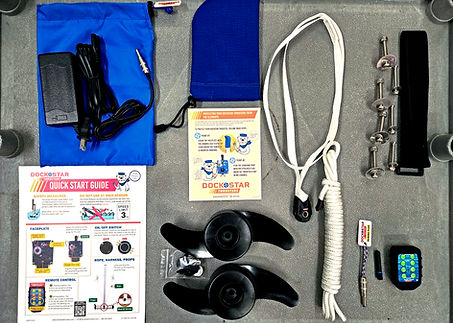
Everything Needed To Get Started
Smart Thruster assembly
Controls and mounting components
Battery and quick-start materials
Installation hardware
Support resources
Installation Without Major Changes
No Major Surgery Required
Many boat owners assume adding a thruster means expensive modifications or cutting into the hull.
DockStar was designed differently.
The external design allows installation without major structural changes, making it a practical upgrade for many boat owners.

Pontoon Boats Need a Different Setup
Pontoon Boats Require A Different Approach
Pontoon boats have unique mounting requirements. DockStar offers configurations designed specifically for pontoon applications so owners can get the same added control.

Why Boat Owners Choose DockStar
Designed for real-world conditions
Works with many boat styles
Minimal modification
DIY friendly options
Support available
External design
The Smart Thruster System
The Smart Thruster system consists of a battery-powered, remote-controlled Smart Thruster and a boat-mounted Track Assembly. Because it is wireless, no hull wiring is required.
Installation: Track Assembly comes in several types to match your preferred mounting location. Any track variant can be DIY-installed in 1–2 hours using basic tools like a drill and a screwdriver.
Operation: Smart Thruster slides down the Track to deploy into the water and slides up for storage or complete removal.

Installation is done by attaching Track Assembly to the boat. Track Assembly comes in 5 types to match the preferred mounting location.
To operate, slide Smart Thruster down the Track Assembly to deploy into the water and slide up for storage or complete removal.
Key Advantages:
-
Rapid Installation: Simple DIY installation takes just 1 to 2 hours using basic hand tools like a drill and screwdriver. No haul-out required.
-
Non-Invasive Installation. Ideal upgrade for older or classic boats. The Track Assembly screws directly onto the hull. No large thru-hole required.
-
Zero Drag & Performance Loss. Best suited for performance-focused boats. The Thruster unit is completely removable from the Track Assembly when not in use.
-
100% Wireless System. No internal wiring is needed for power or control.
How to Operate
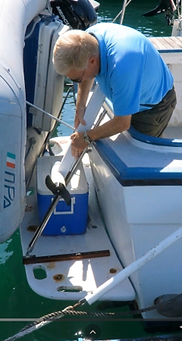
Putting Thruster on Track Assembly.

Lower the Thruster on Track Assembly.
Thruster ready for usage.
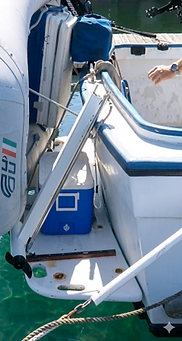
Thruster retracted on Track Assembly.
Specifications & Dimensions
Motor
PMDC Motor 42A 12V x2 (84A Total Output)
Motor Power
1008W (1.35HP, 3-4HP gas engine equivalent)
Thrust
90lb
Runtime
10 minutes per full charge
Battery
Lithium-ion (LFP) Battery, 12.8V, 15Ah
Battery Cycle Life
> 2500 full discharge/recharge cycles
Charging Voltage
110V
Charging time
5 hours from zero charge
Control
RF Remote Control (418MHz)
Total Weight
27.1lb
Bow/Stern
Switchable by settings at customer if necessary
Patent
U.S. Patent No. 9,975,620
Frequently asked questions